The Best 8 WordPress Automation & Marketing Plugins (2025 Review) – And Why KBx Is the Smartest Tool to Start With

If you want to automate your WordPress site, save hours, and convert more visitors, here’s the quick answer:
KBx is the best all-in-one automation and customer-support plugin to start with, and it pairs perfectly with the other 7 tools on this list to build a complete, modern marketing stack.

Now let’s dive into the full guide—short paragraphs, simple language, and zero fluff.

Why WordPress Automation Matters in 2025

Most websites lose visitors because they respond too slowly, collect too few leads, or have no automation at all.

People expect:

  • Instant answers
  • Fast search
  • Personalized support
  • Automatic follow-ups
  • Clear product information

And they don’t want to wait.

That’s exactly why automation plugins exist. They take repetitive tasks off your plate and give visitors a smooth, modern experience.

This guide covers the best 8 plugins I recommend for WordPress automation, starting with the most powerful one for 2025: KBx.

1. KBx – The Ultimate AI Knowledge Base & Customer Support Automation Plugin

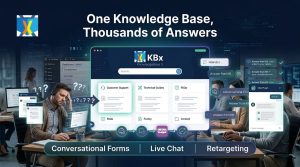
The Best 8 WordPress Automation & Marketing Plugins (2025 Review) – And Why KBx Is the Smartest Tool to Start WithIf you want one plugin that instantly makes your website smarter, faster, and more helpful, start with KBx.

It blends AI-powered search, documentation, instant answers, and automated support into one simple tool.
I’ve tested a lot of plugins—and KBx feels like the future.

What Is KBx?

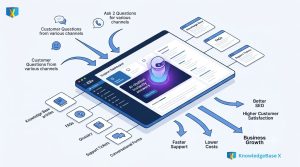
KBx (KnowledgeBase X) is an AI-powered knowledge base and customer-support automation system for WordPress.

It lets you create:

  • Smart searchable knowledge bases
  • AI-generated answers
  • Auto-learning docs
  • Instant-reply widgets
  • Support funnels
  • Product FAQs
  • Help Desk integrations
  • Workflow automation

It’s perfect for:

  • SaaS companies
  • Agencies
  • WooCommerce stores
  • Support teams
  • Bloggers
  • Course creators

If you want fewer support tickets and happier users, this is the tool.

Why Is KBx So Powerful?

Here’s where KBx wins:

 AI auto-search
Visitors get instant, accurate answers without opening multiple pages.

 Automatic answer generation
If you have content, KBx can turn it into structured help articles.

 Works like ChatGPT but trained on your website
This is a game-changer. Your docs answer visitor questions automatically.

 Structured knowledge base builder
Drag-and-drop categories, tags, icons—no coding needed.

 Support flows
Show the right answer before a user submits a ticket.

 WooCommerce support
Auto-FAQs, product help, refund policies, return steps—all automated.

 Multilingual
Supports global customers.

Top Use Cases for KBx

You can use KBx to:

  • Reduce support tickets by 40–70%
  • Speed up customer issue resolution
  • Give visitors instant answers 24/7
  • Replace multiple plugins (FAQ, documentation, chatbot, search, support system)
  • Improve onboarding
  • Build SEO-rich knowledge bases

KBx is basically a digital support employee that never sleeps.

Who Should Use KBx?

This plugin is ideal if you:

  • Run an online shop
  • Sell digital products
  • Manage a SaaS
  • Provide services
  • Want fewer emails and chats
  • Need better customer education

If you want to automate support and improve customer experience without hiring more people, KBx is your tool.

2. FluentCRM – Best for Email Automation

FluentCRM is the top WordPress-native email marketing system.

It gives you:

  • Email newsletters
  • Automated sequences
  • Tagging & segmentation
  • CRM features
  • Sales funnels
  • WooCommerce integration

Why it’s great:
You own your data and avoid monthly SaaS fees.

Best paired with KBx + WooCommerce for post-purchase automation.

3. Uncanny Automator – Best Workflow Automation Tool

Think of it as “Zapier for WordPress.”

You can connect plugins to each other and automate:

  • Form submissions
  • Membership events
  • E-commerce actions
  • LMS triggers
  • User tagging
  • Bulk workflows

If you want your website to run on autopilot, this is essential.

4. Rank Math – Best Automation for SEO

SEO used to be slow and manual.
Rank Math speeds up everything.

Features include:

  • Auto schema
  • Auto meta tags
  • Keyword tracking
  • Content AI
  • 404 monitor
  • Redirections
  • Automated sitemaps

It integrates nicely with KBx because your knowledge base articles become SEO assets.

5. WooFunnels (or FunnelKit) – Best for Checkout & Funnel Automation

If you run WooCommerce, you need funnel automation.

WooFunnels gives you:

  • One-click upsells
  • Order bumps
  • Cart abandonment automation
  • Optimized checkout
  • Email sequences
  • SMS follow-ups

Pair it with KBx for automated “pre-purchase FAQs” that boost conversions.

6. Tidio – Best Live Chat With Light Automation

Tidio gives you:

  • Live chat
  • AI chat responses
  • Simple automation templates
  • Chat inbox for teams

If you want real-time human communication plus AI, this is a simple and effective tool.

KBx covers automated support better, but Tidio is great for real-time human chat.

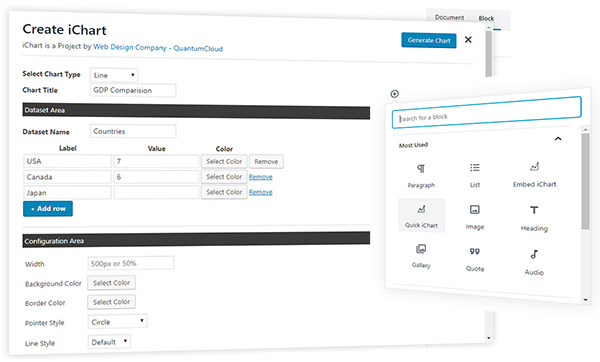
7. iList – Best List-Builder & Visual Presentation Tool

iList lets you create:

  • Visual lists
  • Comparison lists
  • Interactive checklists
  • Top-10 articles
  • Feature breakdowns
  • Product lists

Why it matters for automation:
It saves time creating content that usually takes hours to format manually.

Great for niche sites, SaaS companies, and WooCommerce documentation.

8. WPForms – Best Form Automation

Forms are the backbone of automation.

WPForms gives you:

  • Conversational forms
  • Survey automation
  • Lead collection
  • Conditional logic
  • CRM integrations
  • Payment forms

It connects smoothly with FluentCRM, KBx, and Uncanny Automator for complete workflows.
Feature Comparison Table

Plugin

Best For

Automation Strength

Pairs Well With

KBx

AI support, knowledge base

⭐⭐⭐⭐⭐

WooCommerce, Rank Math

FluentCRM

Email automation

⭐⭐⭐⭐

KBx, WPForms

Uncanny Automator

Workflow automation

⭐⭐⭐⭐⭐

Everything

Rank Math

SEO automation

⭐⭐⭐⭐

KBx

WooFunnels

Funnel automation

⭐⭐⭐⭐

WooCommerce

Tidio

Live chat

⭐⭐⭐

KBx

iList

Content automation

⭐⭐⭐⭐

SEO tools

WPForms

Lead automation

⭐⭐⭐⭐

FluentCRM

How to Build a Complete Automation Stack (Simple Blueprint)

Here’s the combo I recommend for most WordPress websites:

  1. KBx

For support automation and instant answers.

  1. FluentCRM

For email automation and follow-ups.

  1. Rank Math

For SEO automation.

  1. Uncanny Automator

For connecting everything together.

If you run WooCommerce, add:

  • WooFunnels (upsells + checkout)
  • WPForms (lead forms)

This setup gives you a modern, fully automated system that can grow any type of business.

Why KBx Stands Out Among All Automation Tools

Here’s the simplest explanation:

Most plugins solve one problem.
KBx solves three:

  1. Customers can find answers instantly
  2. Your support load decreases
  3. Your SEO improves through knowledge base content

That’s why I recommend starting your automation journey with KBx.

FAQs About WordPress Automation Plugins

  1. Do I need all 8 plugins?

No. Start with 2–4 depending on your goals.

  1. Is KBx a replacement for live chat?

If you handle many repetitive questions, yes. For real-time conversations, pair it with Tidio.

  1. Does automation hurt SEO or user experience?

Not at all. When done right, automation improves speed, navigation, and content accessibility.

  1. Does KBx work with WooCommerce?

Yes—product FAQs, auto answers, return policies, and troubleshooting can all be automated.

  1. Will these plugins slow down my site?

Not if you use optimized, modern plugins like the ones listed above.

Conclusion: The Future of WordPress Is Automation

If you want to grow in 2025, you can’t rely on manual support, manual SEO, or manual content creation.
You need a smarter system.

KBx is the best first step because it gives you instant customer support automation, improves content structure, and reduces support workload immediately.

Pair it with the other plugins on this list, and your website will feel:

  • Faster
  • Smarter
  • More helpful
  • More profitable

Start small. Automate one problem.
Then scale up when you’re ready.


Testimonials

What People Think About Our Products

Customer support is very responsive and professional. The script is awesome and with many features, including A.I. from Dialogflow. High quality.

If have a 7 Stars won’t hesitate to rate that chatbot as a 7stars+++ Very helpful prompt team support Cannot find enough words express my happiness for purchasing that CHATBot Good Luck for you and your items

Save Time. License Better. Deploy Faster. Reinvent WordPress.

Build Conversations & Dynamic Forms for WPBot Pro

Create conditional conversations and forms for a native WordPress ChatBot experience  Build Standard Forms, Dynamic Forms with conditional fields, Calculators, Appointment booking etc. Comes with 7 ready templates built-in. Saves form data into database, auto response, conditional fields, variables, saved revisions and more!

This Addon requires the WPBot Pro V 9.2.0+

What is the Conversational Forms?

Conversational Forms is a powerful Addon for WPBot. It extents WPBot’s functionality and adds the ability to create conditional conversations and/or forms for the WPBot. It is a visual, drag and drop form builder that is easy to use and very flexible. Supports conditional logic and use of variables to build all types of forms or just menu driven conversations with if else logicConversations or forms can be eMailed to you and saved in the database.

What Can You Do with it?

Conversation Forms Pro allows you to create a wide variety of forms, that might include:

  • Conditional Menu Driven Conversations
  • Standard Contact Forms
  • Dynamic, conditional Forms – where fields can change based on the user selections
  • Job Application Forms
  • Lead Capture Forms
  • Various types of Calculators
  • Feedback Survey Forms etc.

How it Works?

After creating a Conversation or form, you can show it in the ChatBot in different ways.

  • Add it to the Start menu
  • Invoke the form intent with a system command to start inside ChatBot any time
  • Load the single intent/form inside a ChatBot widget on any page
  • Load the intent/form inside the ChatBot using a Click to Chat button that can be placed anywhere inside your content on any page.

Conversational Form Features

  • Easy to use visual drag and drop conversations and form builder
  • Create conversational form or just conversation using the HTML element
  • Add text fields, single option selection or multiple option selection with checkboxes
  • Add HTML contents inside the conversation forms
  • eMail conversations or forms to the admin at the end of conversation
  • Set different recipient email addresses for different conversation forms
  • Clone form
  • Export/Import Forms
  • Form Entries saved into database
  • Export Form Entries as CSV
  • 12 Ready Form Templates to Get Started with (Contact Form, Feedback form. Survey Form, BMR Calculator, Appointment Request, Booking Form, Room Area Calculator)
  • 10 Input Fields (Simple Text, Hidden, Email Address, Number, URL, Calculation, Select Option, Checkbox, DateTime Picker, HTML, Image Upload)
  • Processor – Auto Responder – Send an auto response e-mail for form submission
  • Unlimited Conditional Field creation
  • Unlimited Variables creation
  • Form Revisions
  • Create system command to initiate form for ChatBot
  • Add form to Start Menu

Main Features

  • Easy to use visual drag and drop conversations and form builder
  • Create conversational form or just conversation using the HTML element
  • Add text fields, single option selection or multiple option selection with checkboxes
  • Add HTML contents inside the conversation forms
  • eMail conversations or forms to the admin at the end of conversation
  • Set different recipient email addresses for different conversation forms

What is the Bargaining Bot?

Bargaining ChatBot for WoowBot

Say goodbye to the old and boring way of offering discounts for the sake of it. Let your customers haggle for it. Bargaining Bot is the World’s first negotiation bot for WooCommerce. Shoppers are more likely to take advantage of their discount if they have to “work” for it. It makes the shopping experience much more lively and interactive.

Once a deal is made by the Bargaining Bot, the shopper can complete the checkout with the discounted price.

If no deal is made, the ChatBot offers to email the shopper’s last offered price to the shop admin. Admin can then email the Customer to complete the deal.

Why do I need a Bargaining Bot?

Price is the most important factor in a shopper’s decision to buy, yet most shoppers leave because your fixed price is a few dollars too high. The Bargaining Bot lets you capture more sales because the price is negotiated based on what the customer is willing to pay and the minimum price at which you are willing to sell.

Here is why the Bargain Bot will earn you higher revenue and profit margins:

  • Higher Engagement – the Bot creates a new engagement point for shoppers to interact with your products instead of leaving
  • Capture the WooCommerce shoppers while they have a high intent to purchase. This addon helps keep them on your site to finalize a price deal
  • Higher conversions – shoppers love to feel like they are getting a great deal – this addon allows them to pay less than the listed price and therefore convert to a sale
  • All offers are responded to in seconds based on a minimum price point that you set
  • Super easy to install – no coding necessary
  • Super easy to configure – apply the addon in seconds
  • Bargain bot automatically pops up if a user wants to close the browser window from your product single page.
  • Offers do NOT require shoppers to enter their email address to make an offer so you get many more offers made, more offers accepted, and more sales
  • Once shoppers buy one thing using this method, they want to buy more items the same way

HOW IT WORKS FOR THE SHOPPERS?

In addition to your Add to Cart button, the Bargaining Bot enables a Make Your Offer Now button. After clicking this button, shoppers can enter an Offer Price. If their Offer Price is at or above your Minimum Acceptable price, then the Bargaining Bot accepts the offer.

If the Offer Price is below your minimum acceptable price, the Bot will automatically ask the shopper for a better price. If the price is too low, the Bot will make the last offer at your Minimum Acceptable price. If the shopper accepts it then the Bot will apply a product-specific discount and ask to checkout.

If the shopper denies the offer, Bot will ask for the shopper’s email that will be sent to the shop admin with details about the product and the last offer by the shopper.

HOW IT WORKS FOR MERCHANTS?

Once you install the Bot, you may apply the Make Your Offer Now button to any specific product or all products in your store with just one click. You can set up the Minimum Acceptable price for an individual product or set a Global discount percentage from the Bot settings. When you set a Minimum Acceptable price for the individual product the individual pricing will override the global setting.

With our Bot, price negotiation can happen on any product! The main benefits are increased engagement and conversion because you can allow shoppers to stay on your site, make a Price Offer, and your pricing rules will enable them in many cases to buy when they want to buy – now. Sell more, sell faster, and sell at higher margins with the Bargaining Bot! Also, there is the Exit intent detection feature…

Exit Intent Detection to Activate Bargain Bot

If a shopper is on your product single page and wants to close the browser window or leave your website, Bargain bot will come into action. Bargain Bot will detect the shopper’s exit intent and ask to offer their own price instead of just leaving.

Bargaining ChatBot for WoowBot
  • Enable/Disable Bargaining Bot (hide the make your offer button on the product single page)
  • Exclude sale items (If enabled Bargaining button will not display for products that are already on sale)
  • Enable for specific product/s by adding Minimum Acceptable Prices or enable globally
  • Enable global maximum acceptable discount for all products (one click set up)
  • Exclude categories from Global discount
  • Exclude products on sale
  • Maximum Bargaining Allowed Limit
  • Minimum product quantity required for bargaining
  • Exit Intent Detection to activate bargain bot. Bargain bot comes to action if shopper intends to leave the site or close window.
  • Option to enable the Bargain Bot for only Exit Intent (not show the Make offer button)
  • Option to ask for phone number instead of email in final step
  • Shortcode to show Bargain button on any page of your website
  • Set how many Bargaining is allowed before accepting the admin set minimum price
  • Send final offer set by admin by email
  • Disable sending the final offer by email
  • Change quantity on the Bargain window
  • Allow only logged-in users to Bargain.
  • Option to re-position the Make your offer button
  • Change admin email and subject
  • Custom CSS area to modify button or lightbox design using your own CSS code
  • Define Minimum Acceptable Price under individual product to Override the global discount value.
  • Options to change all languages from the plugin settings (bargaining bot can be used with any language)
  • Supports both woocommerce Simple Products and Variable products.
  • Compatible with with WoowBot Pro

**Product variations set by 3rd party plugins may not work. Woocommerce product variations is supported fully.

Main Features

  • Enable/Disable Bargaining Bot (hide the make your offer button on the product single page)
  • Enable for specific product/s by adding Minimum Acceptable Prices or enable globally
  • Options to change all languages from the plugin settings (bargaining bot can be used with any language)
  • Supports both woocommerce Simple Products and Variable products.
  • Compatible with the WoowBot Lite version
    (Product variations set by 3rd party plugins may not work)