No products in the cart.


The Best 8 WordPress Automation & Marketing Plugins (2025 Review) – And Why KBx Is the Smartest Tool to Start With

 If you want one plugin that instantly makes your website smarter, faster, and more helpful, start with KBx.
It blends AI-powered search, documentation, instant answers, and automated support into one simple tool.
I’ve tested a lot of plugins—and KBx feels like the future.
What Is KBx?
KBx (KnowledgeBase X) is an AI-powered knowledge base and customer-support automation system for WordPress.
It lets you create:
- Smart searchable knowledge bases
- AI-generated answers
- Auto-learning docs
- Instant-reply widgets
- Support funnels
- Product FAQs
- Help Desk integrations
- Workflow automation
It’s perfect for:
- SaaS companies
- Agencies
- WooCommerce stores
- Support teams
- Bloggers
- Course creators
If you want fewer support tickets and happier users, this is the tool.
Why Is KBx So Powerful?
Here’s where KBx wins:
✔ AI auto-search
Visitors get instant, accurate answers without opening multiple pages.
✔ Automatic answer generation
If you have content, KBx can turn it into structured help articles.
✔ Works like ChatGPT but trained on your website
This is a game-changer. Your docs answer visitor questions automatically.
✔ Structured knowledge base builder
Drag-and-drop categories, tags, icons—no coding needed.
✔ Support flows
Show the right answer before a user submits a ticket.
✔ WooCommerce support
Auto-FAQs, product help, refund policies, return steps—all automated.
✔ Multilingual
Supports global customers.
Top Use Cases for KBx
You can use KBx to:
- Reduce support tickets by 40–70%
- Speed up customer issue resolution
- Give visitors instant answers 24/7
- Replace multiple plugins (FAQ, documentation, chatbot, search, support system)
- Improve onboarding
- Build SEO-rich knowledge bases
KBx is basically a digital support employee that never sleeps.
Who Should Use KBx?
This plugin is ideal if you:
- Run an online shop
- Sell digital products
- Manage a SaaS
- Provide services
- Want fewer emails and chats
- Need better customer education
If you want to automate support and improve customer experience without hiring more people, KBx is your tool.
 FluentCRM is the top WordPress-native email marketing system.
It gives you:
- Email newsletters
- Automated sequences
- Tagging & segmentation
- CRM features
- Sales funnels
- WooCommerce integration
Why it’s great:
You own your data and avoid monthly SaaS fees.
Best paired with KBx + WooCommerce for post-purchase automation.
 Think of it as “Zapier for WordPress.”
You can connect plugins to each other and automate:
- Form submissions
- Membership events
- E-commerce actions
- LMS triggers
- User tagging
- Bulk workflows
If you want your website to run on autopilot, this is essential.
 SEO used to be slow and manual.
Rank Math speeds up everything.
Features include:
- Auto schema
- Auto meta tags
- Keyword tracking
- Content AI
- 404 monitor
- Redirections
- Automated sitemaps
It integrates nicely with KBx because your knowledge base articles become SEO assets.
 If you run WooCommerce, you need funnel automation.
WooFunnels gives you:
- One-click upsells
- Order bumps
- Cart abandonment automation
- Optimized checkout
- Email sequences
- SMS follow-ups
Pair it with KBx for automated “pre-purchase FAQs” that boost conversions.
 Tidio gives you:
- Live chat
- AI chat responses
- Simple automation templates
- Chat inbox for teams
If you want real-time human communication plus AI, this is a simple and effective tool.
KBx covers automated support better, but Tidio is great for real-time human chat.
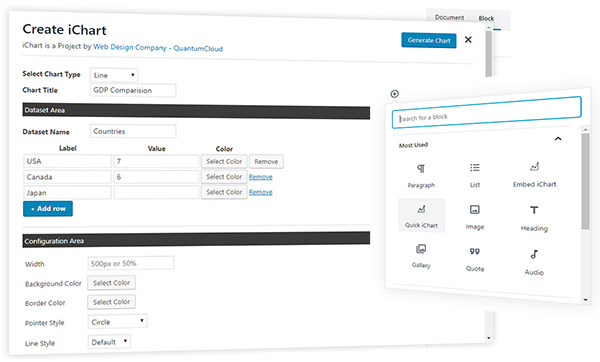
 iList lets you create:
- Visual lists
- Comparison lists
- Interactive checklists
- Top-10 articles
- Feature breakdowns
- Product lists
Why it matters for automation:
It saves time creating content that usually takes hours to format manually.
Great for niche sites, SaaS companies, and WooCommerce documentation.
 Forms are the backbone of automation.
WPForms gives you:
- Conversational forms
- Survey automation
- Lead collection
- Conditional logic
- CRM integrations
- Payment forms
It connects smoothly with FluentCRM, KBx, and Uncanny Automator for complete workflows.