No products in the cart.

OpenAI for ChatBot

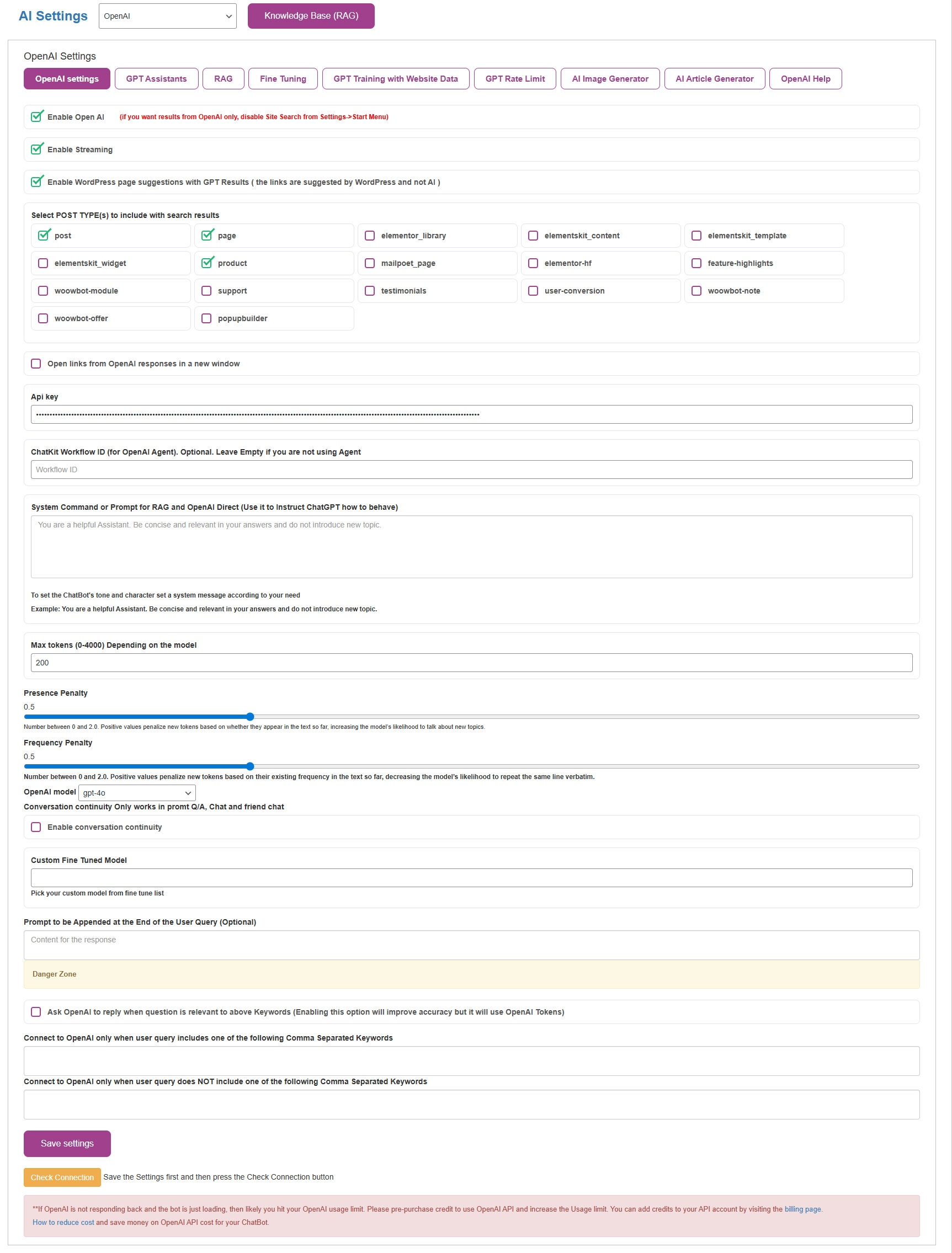
As soon as you add the OpenAI API key to the ChatBot OpenAI settings, it can answer all types of generic questions. Questions like “what is the capital city of Japan” or “What is a blackhole?” All the OpenAI models are available to choose from: GPT 4o, GPT 4 Turbo, GPT4, GPT3 Turbo etc.
WPBot now provides an option to display relevant page results from your own website with all the GPT responses. This is a great way to customize the OpenAI responses. This feature is now available with all our licenses.
You can also limit connection to the OpenAI based on Keywords you specify. This works both with Inclusion and/or Exclusion of keywords in the user query.

The Assistants API allows you to build AI assistants within your own applications. An Assistant has instructions and can leverage models, tools, and knowledge to respond to user queries. With WPBot Professional and Master licenses use the Assistants you develop on the OpenAI playground trained with your own specific knowledge and skills. From handling FAQs to offering customized suggestions, these Assistants are seamlessly integrated into your WordPress site by simply adding the GPT Assistants ID.
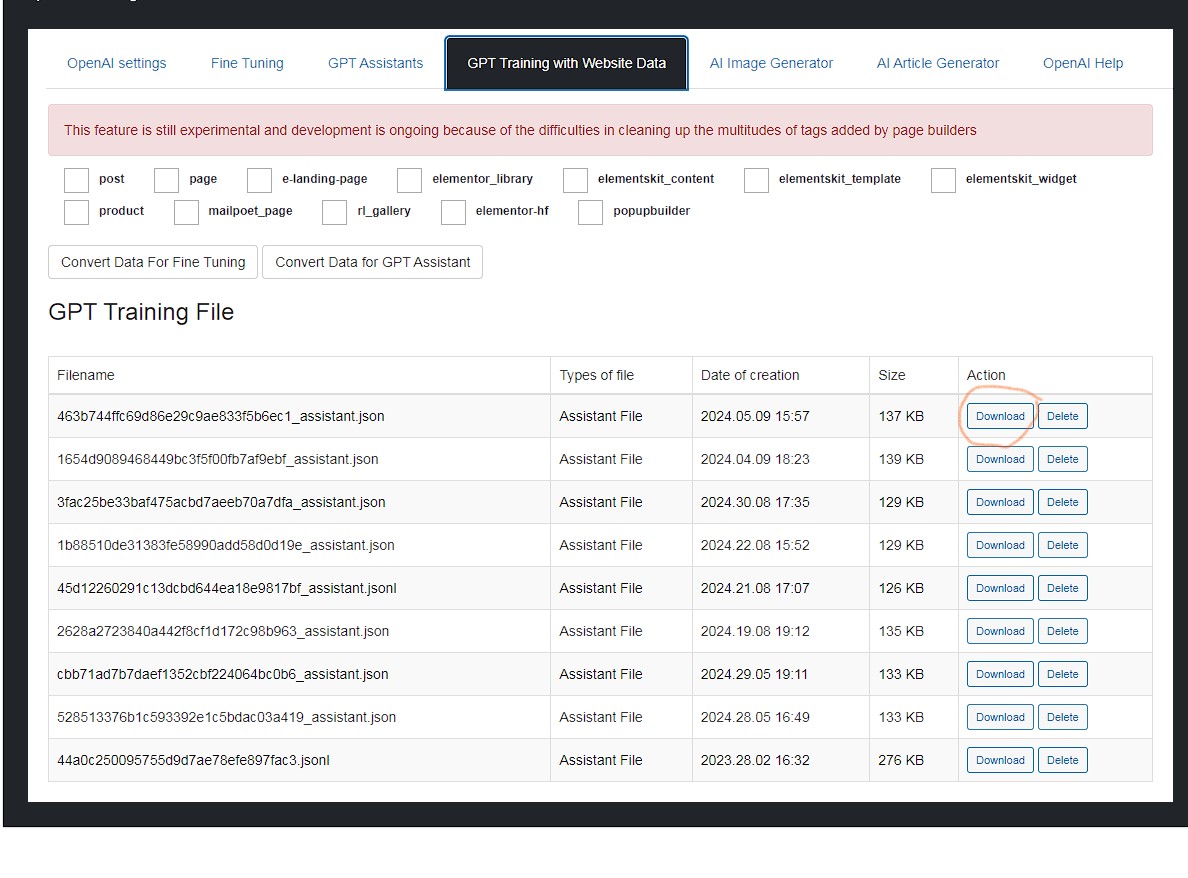
** With GPT Assistants, you can upload your files and website contents to train the Bot and provide relevant answers from your own data. WPBot indexes your website pages, posts and custom post types and gives you a JSON file that you can upload to your GPT Assistant for Training. This is a very simple process. Check this article for more details on how to Train your AI ChatBot with your website data.
** Also, check this article on How to save money and reduce OpenAI API costs for your ChatBot


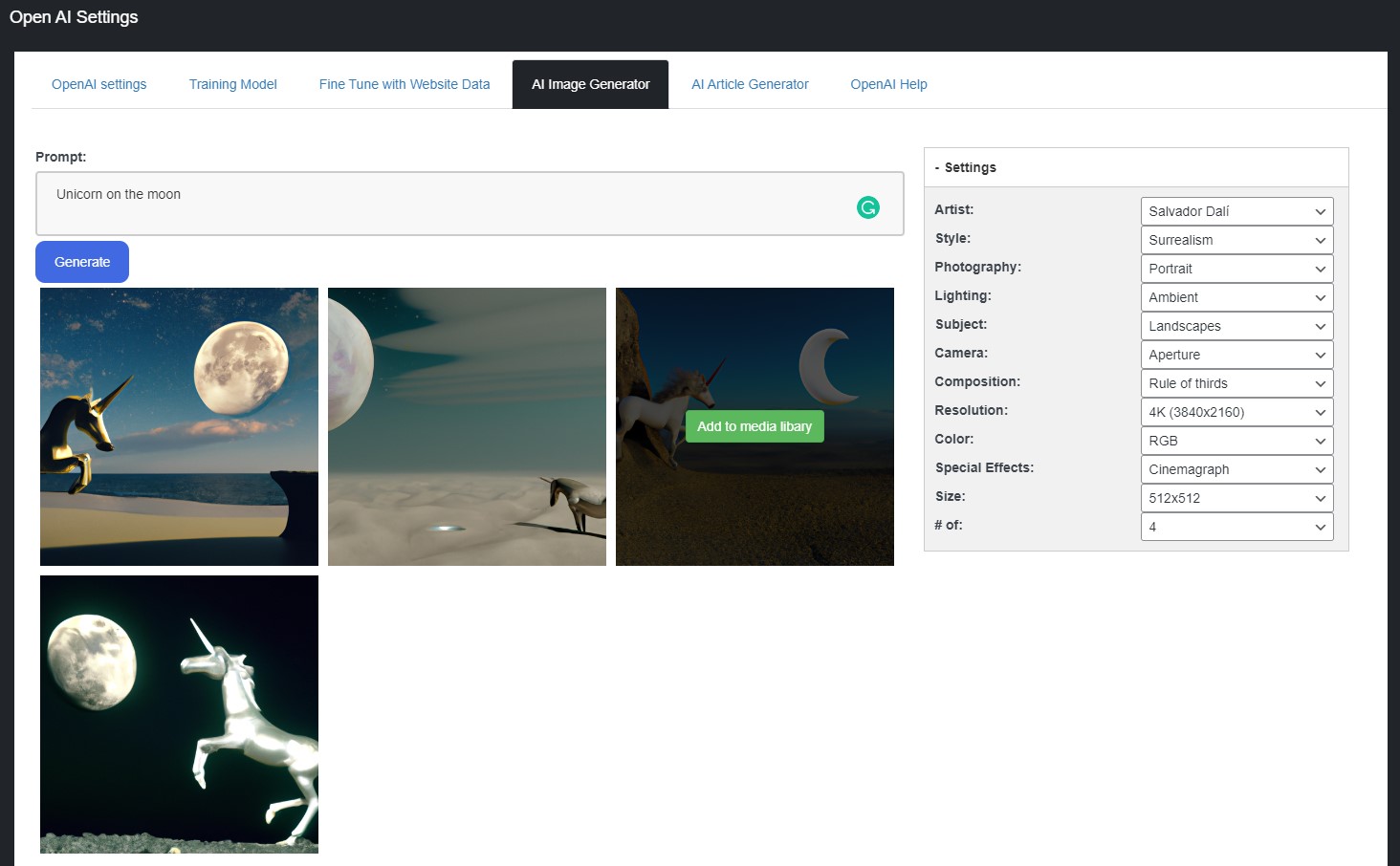
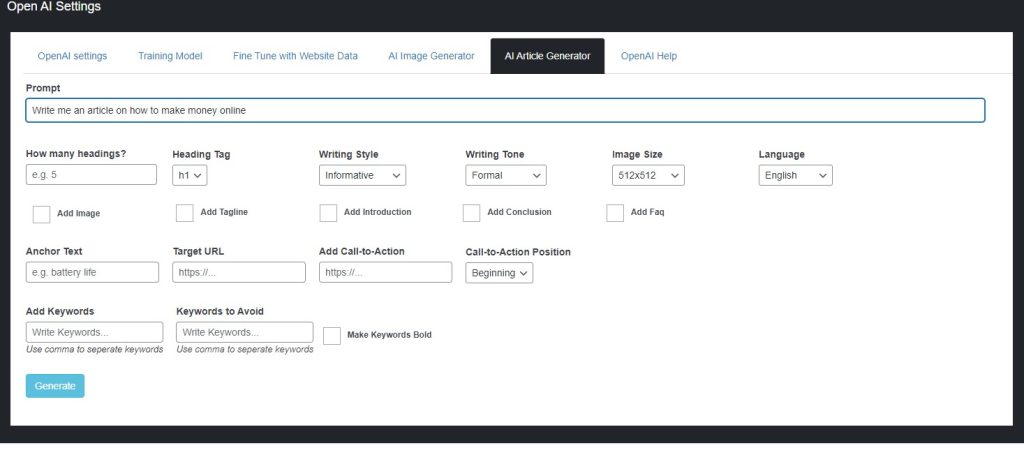
Create royalty free AI generated images just by writing what kind of images you want. Select the image you like and download it directly to your WordPress media library. You can select from a wide variety of options to fine tune your image style, lighting, color, size etc.


KBx Supports all the Popular and latest LLM AI models. OpenAI, Gemini, GROK, OLLAMA are supported natively, and they work with RAG. All the other AI models are supported through OpenRouter (GPT, Claude, Grok, Cohere, DeepSeek, Mistral, Llama etc.) and they also work with RAG. Below is a list of OpenAI related features available with KBx.
As soon as you add the OpenAI API key to the ChatBot OpenAI settings, it can answer all types of user questions. All the latest OpenAI models are available to choose from.
You can also send the AI model instructions on how to act as an agent for your website and how to answer the user questions.
KBx provides an option to display relevant page results from your own website with all the GPT responses. This is a great way to customize the OpenAI responses. This feature is now available with all our licenses.
You can also limit connection to the OpenAI based on Keywords you specify. This works both with Inclusion and/or Exclusion of keywords in the user query.


KBx supports RAG (Retrieval-Augmented Generation) & Knowledge Base Vector Database. You can select your Pages, Posts, and Custom Post Types to embed their contents into a Vector database and use that data with an AI model to generate accurate answers. The KnowledgeBase vector database can also be managed from the WordPress backend.
The Professional and Master licenses provide additional Advanced features to upload PDF documents, CSV, and XML files for embedding. You can also add a Sitemap XML link to parse the data into your vector database. The Professional and Master licenses also allow Auto-Synchronization of the RAG vector database. Whenever you update a page, post, or product, the updated contents will be auto synchronized with the RAG Vector Database.
Retrieval-Augmented Generation (RAG) offers key benefits like reduced hallucinations, improved accuracy, and up-to-date responses by grounding LLMs in external data, making AI more trustworthy and reliable for specific domains, with added advantages of cost-efficiency (no constant retraining), transparency (citations), and better control over data.
The Assistants API allows you to build AI assistants within your own applications. An Assistant has instructions and can leverage models, tools, and knowledge to respond to user queries. With KBx Professional and Master licenses use the Assistants you develop on the OpenAI playground trained with your own specific knowledge and skills. From handling FAQs to offering customized suggestions, these Assistants are seamlessly integrated into your WordPress site by simply adding the GPT Assistants ID.
** With GPT Assistants, you can upload your files and website contents to train the Bot and provide relevant answers from your own data. KBx indexes your website pages, posts and custom post types and gives you a JSON file that you can upload to your GPT Assistant for Training. This is a very simple process. Check this article for more details on how to Train your AI ChatBot with your website data.
** Also, check this article on How to save money and reduce OpenAI API costs for your ChatBot
** You can use different GPT Assistants for different pages or even logged-in users allowing you to create multiple ChatBots for different purposes on a single website.

Multiple or different GPT Assistant support for different web pages is now possible in different modes allowing you to create different ChatBots on the same website.
The ChatBot widget is embedded within a page. You can define different GPT Assistants for different widgets on different pages. Then upload specific documents on a particular GPT Assistant for a specific widget on a page. You can define the GPT Assistant ID with the Widget shortcode. Both our Professional and Master licenses support this. Please check the ChatBot Pro->Settings->Embed and Click to Chat area for more details on the shortcode parameters.
Different GPT Assistant IDs can also be used in the floating icon mode using a shortcode.
You can also assign a different GPT Assistant ID for logged-in users or for a specific user role.
Conversational Forms is a powerful module for KBx. It extends KBx’s functionality and adds the ability to create conditional conversations and/or forms for the KBx. Supports conditional logic and use of variables to build all types of forms or just menu driven conversations with if else logic. Conversational forms can also work with OpenAI to generate Dynamic responses based on user submitted fields. This feature is multi-modal and supports uploading Image or Audio files for analysis by OpenAI AI models. Check the article on how Conversational forms work with OpenAI.
Create royalty free AI generated images just by writing what kind of images you want. Select the image you like and download it directly to your WordPress media library. You can select from a wide variety of options to fine tune your image style, lighting, color, size etc.


A great way to engage visitors. Easy to use, and understand. I highly recommend.

Customer support is very responsive and professional. The script is awesome and with many features, including A.I. from Dialogflow. High quality.


We help your business grow by connecting you to your customers.
Click here to chat with me!
Search our website now
Latest Posts

KBx (KnowledgeBase X) helps businesses organize support knowledge, answer recurring questions, connect customers with support, manage support requests, and collect information through conversational forms. By examining recurring questions, unresolved requests, documentation gaps, and customer feedback, businesses can use KBx (KnowledgeBase X) to identify where customers need clearer answers and a better support experience. Why Are Customers Still Asking Questions When Your Website Already Has the Answers? Your support inbox can reveal problems that website analytics alone cannot explain. Customers may visit a help article, search for a product feature, open a chatbot, or submit a ticket because the information available…

If you’re looking for the best AI chatbots for your business in 2025, here’s the quick answer:AI chatbots are no longer “nice-to-have.” They’re essential. The top tools help businesses automate support, boost conversions, reduce workload, and create 24/7 customer experiences. And among them, KBx (KnowledgeBase X) stands out for its clean design, powerful AI integrations (OpenAI, Gemini, OpenRouter, local models), and zero-coding setup. This guide breaks down the top 8 AI chatbots every business should consider in 2025, with a detailed comparison and a deeper look at why KBx is quickly becoming a favorite among small businesses, agencies, and WordPress site owners.…

If you want to automate your WordPress site, save hours, and convert more visitors, here’s the quick answer:KBx is the best all-in-one automation and customer-support plugin to start with, and it pairs perfectly with the other 7 tools on this list to build a complete, modern marketing stack. Now let’s dive into the full guide—short paragraphs, simple language, and zero fluff. Why WordPress Automation Matters in 2025 Most websites lose visitors because they respond too slowly, collect too few leads, or have no automation at all. People expect: Instant answers Fast search Personalized support Automatic follow-ups Clear product information And…

Customer support can quickly become overwhelming for WordPress website owners. Repetitive questions, delayed responses, and limited support hours frustrate users—and drain your time. The solution? Automated customer support with KBx. In this article, I’ll explain how KBx helps WordPress users automate support, reduce workload, and improve customer experience—plus the best practices to get real results. No fluff. Just practical guidance. Why Customer Support Automation Matters for WordPress Sites Let’s start with the reality. Most WordPress websites deal with: Repeated “How do I…?” questions Support tickets for basic issues Visitors leaving before getting answers Limited staff or solo site owners Users…


Create conditional conversations and forms for a native WordPress ChatBot experience Build Standard Forms, Dynamic Forms with conditional fields, Calculators, Appointment booking etc. Comes with 7 ready templates built-in. Saves form data into database, auto response, conditional fields, variables, saved revisions and more!
This Addon requires the WPBot Pro V 9.2.0+

Conversational Forms is a powerful Addon for WPBot. It extents WPBot’s functionality and adds the ability to create conditional conversations and/or forms for the WPBot. It is a visual, drag and drop form builder that is easy to use and very flexible. Supports conditional logic and use of variables to build all types of forms or just menu driven conversations with if else logic. Conversations or forms can be eMailed to you and saved in the database.
Conversation Forms Pro allows you to create a wide variety of forms, that might include:
After creating a Conversation or form, you can show it in the ChatBot in different ways.


Say goodbye to the old and boring way of offering discounts for the sake of it. Let your customers haggle for it. Bargaining Bot is the World’s first negotiation bot for WooCommerce. Shoppers are more likely to take advantage of their discount if they have to “work” for it. It makes the shopping experience much more lively and interactive.
Once a deal is made by the Bargaining Bot, the shopper can complete the checkout with the discounted price.
If no deal is made, the ChatBot offers to email the shopper’s last offered price to the shop admin. Admin can then email the Customer to complete the deal.
Price is the most important factor in a shopper’s decision to buy, yet most shoppers leave because your fixed price is a few dollars too high. The Bargaining Bot lets you capture more sales because the price is negotiated based on what the customer is willing to pay and the minimum price at which you are willing to sell.
Here is why the Bargain Bot will earn you higher revenue and profit margins:
In addition to your Add to Cart button, the Bargaining Bot enables a Make Your Offer Now button. After clicking this button, shoppers can enter an Offer Price. If their Offer Price is at or above your Minimum Acceptable price, then the Bargaining Bot accepts the offer.
If the Offer Price is below your minimum acceptable price, the Bot will automatically ask the shopper for a better price. If the price is too low, the Bot will make the last offer at your Minimum Acceptable price. If the shopper accepts it then the Bot will apply a product-specific discount and ask to checkout.
If the shopper denies the offer, Bot will ask for the shopper’s email that will be sent to the shop admin with details about the product and the last offer by the shopper.
Once you install the Bot, you may apply the Make Your Offer Now button to any specific product or all products in your store with just one click. You can set up the Minimum Acceptable price for an individual product or set a Global discount percentage from the Bot settings. When you set a Minimum Acceptable price for the individual product the individual pricing will override the global setting.
With our Bot, price negotiation can happen on any product! The main benefits are increased engagement and conversion because you can allow shoppers to stay on your site, make a Price Offer, and your pricing rules will enable them in many cases to buy when they want to buy – now. Sell more, sell faster, and sell at higher margins with the Bargaining Bot! Also, there is the Exit intent detection feature…
If a shopper is on your product single page and wants to close the browser window or leave your website, Bargain bot will come into action. Bargain Bot will detect the shopper’s exit intent and ask to offer their own price instead of just leaving.

**Product variations set by 3rd party plugins may not work. Woocommerce product variations is supported fully.