No products in the cart.

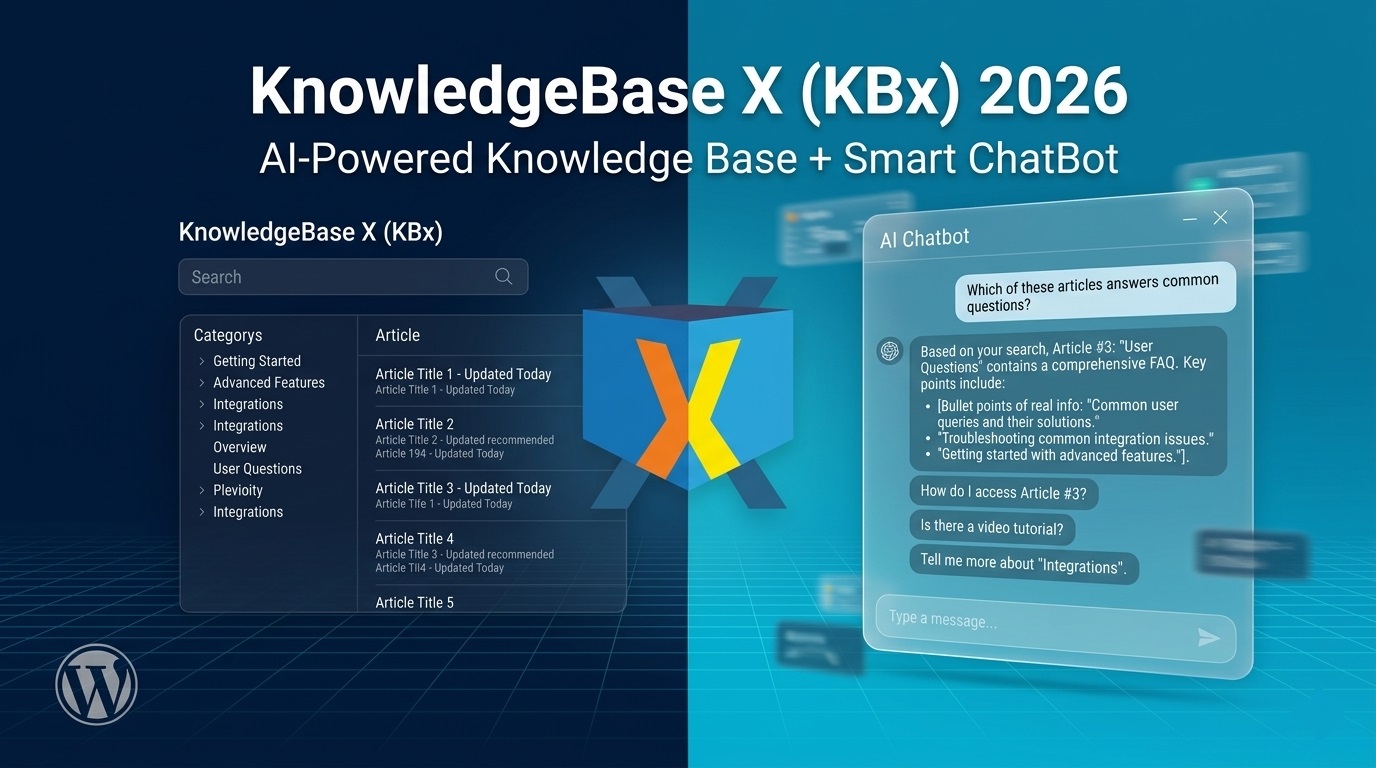
KnowledgeBase X (KBx) Review 2026: The Ultimate AI-Powered Knowledge Base + ChatBot Plugin

Yes — KBx delivers a complete self-service support system in one WordPress plugin. It combines searchable knowledge base articles, FAQ, glossary, AI chatbot, live chat, and tickets. Busy site owners use it to cut support tickets dramatically while giving visitors instant answers 24/7.
I tested it on real sites. Here’s my honest, no-fluff review.
What Exactly Is KnowledgeBase X (KBx)?
 KBx is a WordPress plugin that turns your site into a smart helpdesk from QuantumCloud.
You create knowledge base articles once. The same content automatically becomes:
- Searchable docs
- Accordion FAQs
- A-to-Z glossary
Add the floating AI chatbot and it answers questions using your articles plus OpenAI or DialogFlow. Pro versions add live human chat and full ticket system.
Core idea: One plugin replaces multiple tools (Zendesk lite + knowledge base plugin + chatbot).
Why Most Sites Need This in 2026
Support tickets eat time and money. Visitors hate waiting.
KBx solves both:
- Visitors self-serve → fewer tickets
- AI handles repetitive questions → you focus on complex issues
- All data stays on your WordPress site
Perfect for SaaS, WooCommerce stores, service businesses, agencies, and membership sites.
Key Features That Actually Matter
Knowledge Base Articles
- Unlimited articles + categories
- Drag-and-drop sorting
- Sticky articles
- Table of contents (auto-generated)
- Highlight boxes (success, warning, etc.)
- File attachments
- Alternative questions for better search matching
- Upvote/downvote with editable counts
- View statistics
- Role-based access (restrict by user role)
FAQ & Glossary (Zero Extra Work)
- Same articles display as accordion FAQ
- Same articles become A-to-Z glossary via shortcode
- Super useful for SEO and user experience
AI ChatBot (The Real Game Changer)
- Floating help icon
- Searches your KB articles instantly
- OpenAI (ChatGPT) integration — train with your site data
- DialogFlow support for advanced flows
- Basic responses work without AI keys
- Conversational forms (leads, surveys, calculators)
- Retargeting messages on exit intent
- Persistent chat history
- Works in any language (RTL too)
Pro Extras (Worth It for Most)
- Live human chat from dashboard
- Full support ticket system
- WooCommerce integration
- Advanced OpenAI training (fine-tuning + assistants)
- White label options
- Multi-site licenses
Real Results You Can Expect
Users report big drops in support volume. One common outcome: 50-70% fewer tickets after proper setup.
Why it works:
- AJAX search is fast and predictive
- Chatbot suggests articles + answers directly
- Upvote data helps you improve weak content
- Statistics show popular searches and articles
KBx Pricing (2026)
Yearly Plans:
- Starter: $49 — Core KB + basic chatbot
- Professional: $99 — Advanced AI, forms, Woo
- Master: $159 — Everything (live chat + tickets) — most popular
Lifetime Options also available (big savings long-term).
Free lite version exists on WordPress.org — great for testing the knowledge base and basic chatbot.
My take: Master plan pays for itself quickly if you value your time or run paid support.
How Easy Is Setup? (Beginner Friendly)
- Install plugin
- Create categories and articles (feels like normal posts)
- Add shortcode to a page for full KB
- Enable chatbot and connect OpenAI key (optional but powerful)
- Customize colors and icon
- Done
Total time for basic setup: under 1 hour. Full training takes longer but delivers better results.
Pro tip: Use the built-in AI writing panel to draft articles faster.
Pros vs Cons
Pros:
- All-in-one (no need for 4 separate plugins)
- Strong AI training options
- Excellent for SEO (structured content)
- Good support from the team
- Stays on your server (privacy + speed)
- Regular updates
Cons:
- Learning curve for advanced AI features
- Active installs still growing (not as huge as some competitors)
- Best results need time to build quality KB content
- Live chat/tickets only in higher plans
KBx vs Popular Alternatives
Feature | KBx | Heroic KB | BetterDocs | Echo KB |
Built-in AI Chatbot | Yes | Limited | Add-on | Basic |
Glossary + FAQ | Automatic | Separate | Good | Good |
Tickets + Live Chat | Yes (Pro) | No | No | No |
Pricing (approx) | $49–159/yr | $129+ | $69+ | Free/Paid |
All-in-one | Strongest | KB focused | Docs focused | Simple |
KBx wins when you want chatbot + KB + support tools together.
Best Use Cases
- WooCommerce stores: Product guides + order help chatbot
- SaaS products: Feature docs + troubleshooting bot
- Agencies: Client portals with restricted access
- Membership sites: Onboarding guides + FAQ
- Service businesses: Booking help + policy explanations
Setup Tips for Maximum Results
- Write articles in clear, question-based format
- Add multiple alternative questions per article
- Train OpenAI with your full site content (easy JSON export)
- Place KB page in main menu
- Enable upvoting and monitor statistics
- Start with 10-15 core articles, then expand
Pro move: Add chatbot to high-traffic pages and use retargeting for conversions.
Lorem ipsum dolor sit amet, consectetur adipiscing elit. Ut elit tellus, luctus nec ullamcorper mattis, pulvinar dapibus leo.
Common Questions People Ask
Does it slow down my site? No. It’s lightweight and uses AJAX. Optimize images as usual.
Can I train it with my existing content? Yes — pages, posts, and KB articles.
Is it good for non-English sites? Strong multilingual support and RTL.
Support quality? Users consistently praise fast, helpful responses.
Final Verdict: Should You Buy KBx in 2026?
Yes — if you want one plugin to handle knowledge base, AI support, and reduce tickets.
It’s not the cheapest pure KB plugin. But as a complete support system, it offers excellent value.
Start with the free version or Starter plan. Build your knowledge base. Upgrade when you need advanced AI or human support features.
For busy site owners who hate managing multiple tools, KBx feels like the smart long-term choice.
FAQs
Is KBx worth it in 2026? Yes for most mid-sized sites that want AI-powered self-service.
Do I need coding skills? No. Everything works with shortcodes and settings panels.
Can it replace Zendesk or Help Scout? For many small and medium businesses — yes.
How good is the AI chatbot? Very capable once trained. Combines your content with OpenAI smarts.
Lifetime license available? Yes, with good savings.
Ready to try it? Check the free version on WordPress.org or head to the official site for demos and pro features.
What part of your support process wastes the most time right now? Drop a comment — I’d love to hear.