No products in the cart.

How KBx (KnowledgeBase X) Turns Every Customer Question into a Business Asset

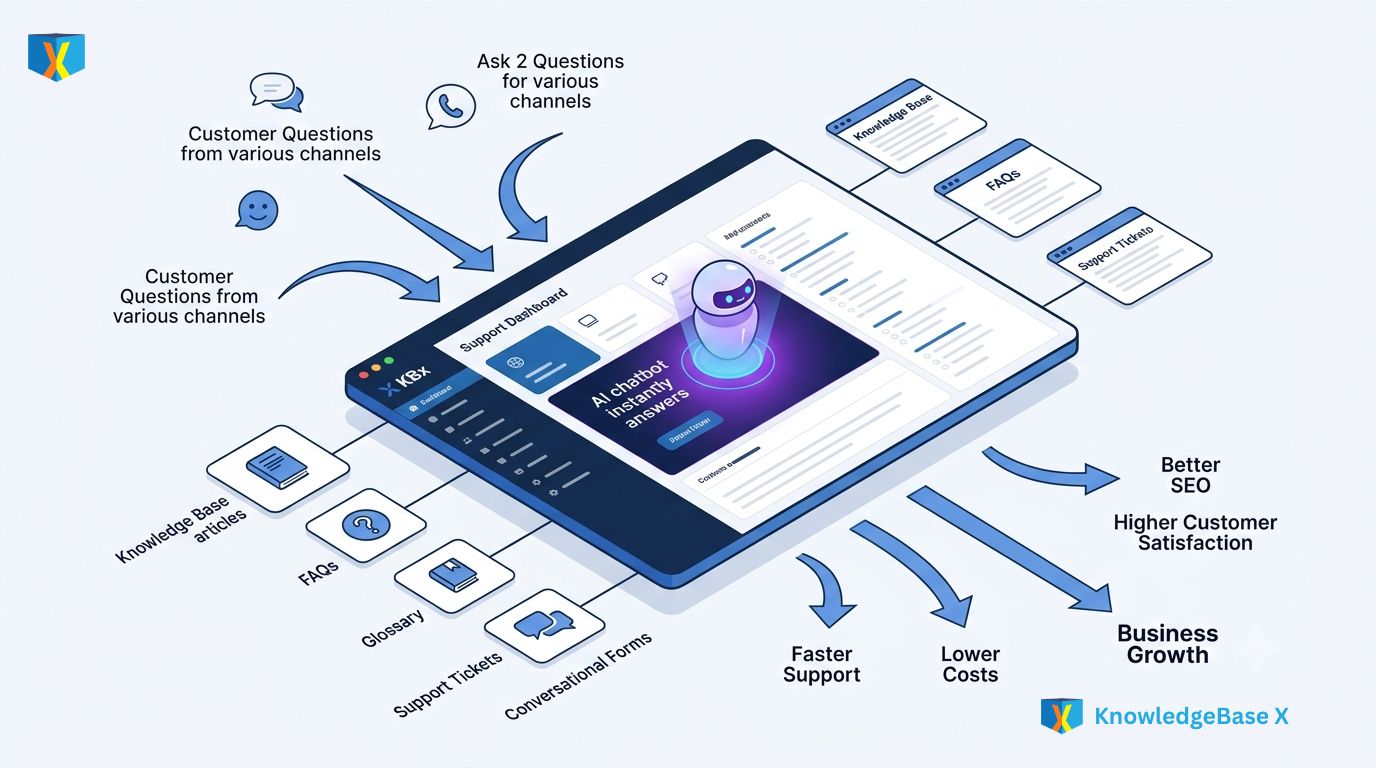
KBx (KnowledgeBase X) transforms every customer question into a reusable business asset by combining a centralized knowledge base, AI-powered customer support, FAQs, glossary, support tickets, conversational forms, and live chat in one WordPress solution. KBx (KnowledgeBase X) reduces repetitive support work, improves customer satisfaction, and continuously builds a searchable knowledge library that grows more valuable with every interaction.

Why Does Every Repeated Customer Question Cost More Than You Think?
Most businesses answer the same questions dozens or even hundreds of times every month. Every repeated reply consumes support hours, delays new inquiries, and creates inconsistent customer experiences.
KBx (KnowledgeBase X) changes that cycle completely. Every answered question becomes searchable knowledge that helps the next visitor find answers instantly instead of creating another support ticket.
Instead of treating support as a recurring expense, KBx (KnowledgeBase X) turns support conversations into long-term digital assets that continue generating value for years.
Why Do Most WordPress Support Systems Become Disorganized So Quickly?
Many websites spread customer information across multiple tools:
- FAQs in one plugin
- Documentation elsewhere
- Live chat in another platform
- Contact forms separately
- Email tickets inside inboxes
- AI chatbot using another service
Customers jump between multiple pages while support teams search several dashboards before answering a simple question.
KBx (KnowledgeBase X) removes this fragmentation by keeping everything inside one unified knowledge ecosystem.
Centralized Knowledge Management
Why Should Every Customer Answer Live in One Place?
Every accurate answer has long-term value.
Instead of writing the same response repeatedly, KBx (KnowledgeBase X) stores verified answers inside one centralized knowledge repository where customers and employees can immediately find them.
A single answer can serve thousands of visitors without requiring additional staff time.
How Does KBx (KnowledgeBase X) Build a Living Knowledge Library?
Unlike static documentation, KBx (KnowledgeBase X) continuously grows whenever new questions appear.
The knowledge ecosystem can include:
- Knowledge Base Articles
- Frequently Asked Questions
- Product Documentation
- Installation Guides
- Troubleshooting Articles
- Best Practices
- Tutorials
- Glossary Definitions
- Internal Documentation
- Customer Support Articles
Every new article expands the searchable intelligence of KBx (KnowledgeBase X).
Why Does Centralized Search Save More Time Than Better Support Agents?
Most customers don’t actually want to contact support.
Most customers simply want fast answers.
KBx (KnowledgeBase X) allows customers to search across:
- Knowledge Base
- FAQ
- Glossary
- Product Documentation
- Categories
- Tags
- Related Articles
Instead of opening a ticket, customers often solve their own problem within seconds.
How Does KBx (KnowledgeBase X) Organize Thousands of Articles?
Large documentation libraries quickly become overwhelming without structure.
KBx (KnowledgeBase X) organizes content using:
- Categories
- Subcategories
- Tags
- Custom taxonomy
- Article relationships
- Related content
- Popular articles
- Recent updates
Customers spend less time searching because the information architecture naturally guides discovery.
Why Does Every Published Article Become a Long-Term SEO Asset?
Google rewards helpful content.
AI Answer Engines reward structured knowledge.
Every documentation page inside KBx (KnowledgeBase X) becomes another opportunity to rank for long-tail searches like:
- How to configure API keys
- WooCommerce checkout error
- WordPress login issue
- Payment gateway timeout
- Product import guide
Each article can attract visitors months or even years after publication.
How Does KBx (KnowledgeBase X) Improve Internal Team Productivity?
Customer knowledge should help employees too.
Sales teams answer product questions faster.
Support teams reuse existing documentation.
Marketing teams discover common customer pain points.
Developers identify recurring technical issues.
Instead of scattered information, KBx (KnowledgeBase X) creates one trusted knowledge source for every department.
What Happens When Knowledge Lives Inside Individual Employees?
Many businesses lose valuable knowledge whenever employees leave.
Critical documentation disappears.
Support quality becomes inconsistent.
Training new staff takes weeks.
KBx (KnowledgeBase X) captures institutional knowledge before it disappears, creating a permanent business asset independent of individual employees.
Why Does Structured Knowledge Improve AI Accuracy?
Artificial Intelligence performs better when reliable information already exists.
KBx (KnowledgeBase X) gives AI structured documentation instead of forcing AI models to guess.
The result is:
- More accurate answers
- Better context
- Fewer hallucinations
- Consistent brand messaging
- Faster customer assistance
AI-Powered Customer Support
Why Should AI Answer Questions Before Humans Do?
Support teams should solve difficult problems.
Artificial intelligence should solve repetitive questions.
KBx (KnowledgeBase X) combines AI with structured documentation so customers receive immediate responses without waiting for office hours.
How Does KBx (KnowledgeBase X) Use Existing Knowledge Instead of Inventing Answers?
Many generic AI chatbots generate responses without verified company information.
KBx (KnowledgeBase X) references existing documentation, FAQs, glossary entries, and knowledge articles before generating responses.
Customers receive answers based on actual business knowledge instead of assumptions.
Why Does AI Become Smarter When Connected to KBx (KnowledgeBase X)?
Every new article expands AI capabilities.
Every FAQ improves AI confidence.
Every glossary definition improves terminology.
Every support solution increases future response quality.
The intelligence of KBx (KnowledgeBase X) naturally grows alongside the knowledge library.
How Does KBx (KnowledgeBase X) Reduce Support Ticket Volume?
Many tickets involve simple questions:
- Password reset
- Shipping policy
- Refund rules
- Product installation
- License activation
- Billing questions
KBx (KnowledgeBase X) allows AI to answer these instantly before customers submit tickets.
Support teams spend more time solving complex problems that actually require human expertise.
Why Does Faster Response Time Increase Customer Trust?
Customers rarely enjoy waiting.
A traditional support workflow often looks like:
Customer → Email → Queue → Agent → Reply
KBx (KnowledgeBase X) transforms the workflow:
Customer → AI Search → Knowledge Base → Instant Answer
Minutes replace hours.
Hours replace days.
KBx (KnowledgeBase X) AI Support Workflow
| Traditional Support | KBx (KnowledgeBase X) |
| Email queue | Instant AI response |
| Manual searching | Automated knowledge retrieval |
| Repeated typing | Reusable knowledge |
| High support cost | Lower operational cost |
| Long wait time | Immediate assistance |
| Agent dependency | Self-service first |
What ROI Can Businesses Expect from AI-Powered Knowledge?
Consider a realistic support operation.
| Metric | Before KBx (KnowledgeBase X) | After KBx (KnowledgeBase X) |
| Monthly Tickets | 1,200 | 600 |
| Average Cost Per Ticket | $8 | $8 |
| Monthly Support Cost | $9,600 | $4,800 |
| Annual Support Cost | $115,200 | $57,600 |
| Estimated Annual Savings | — | $57,600 |
Simple ROI Formula
Annual Savings = (Reduced Tickets × Average Ticket Cost × 12)
Example:
- Reduced tickets: 600
- Cost per ticket: $8
600 × $8 × 12 = $57,600 annual savings
Self-Service Growth & Business Efficiency
Why Do Modern Customers Prefer Self-Service?
Customers increasingly prefer solving problems independently.
They search documentation before contacting support.
They expect immediate answers.
They often leave websites that make support difficult.
KBx (KnowledgeBase X) gives customers exactly what modern users expect.
How Does KBx (KnowledgeBase X) Turn Self-Service Into Revenue?
Every successful self-service interaction creates multiple business benefits:
- Lower support costs
- Higher customer satisfaction
- Faster purchasing decisions
- Reduced cart abandonment
- Better customer retention
- Increased team productivity
Support becomes a revenue multiplier instead of a cost center.
Why Does Every Solved Question Improve Future Customer Experiences?
Every documented solution benefits future visitors.
One installation guide might help:
- 50 customers
- 500 customers
- 5,000 customers
The documentation workload remains almost identical while the business value keeps increasing.
That is why KBx (KnowledgeBase X) transforms support into a scalable business asset.
How Do Conversational Forms Capture Better Leads?
Traditional contact forms ask questions.
Conversational forms start conversations.
KBx (KnowledgeBase X) presents forms in a friendly, interactive format that feels natural rather than overwhelming.
Customers complete more forms because each step feels simple.
Why Do Conversational Forms Improve Data Quality?
Long forms often cause abandonment.
KBx (KnowledgeBase X) collects information gradually:
- Name
- Company
- Website
- Product
- Budget
- Project Details
- Support Issue
Breaking forms into conversational steps improves completion rates while collecting more accurate information.
How Can KBx (KnowledgeBase X) Automate Customer Qualification?
Not every inquiry requires immediate human attention.
KBx (KnowledgeBase X) can gather essential information before forwarding requests to the appropriate department.
Examples include:
- Sales inquiries
- Technical support
- Partnership requests
- Product demonstrations
- Feature requests
- Bug reports
Support teams receive better information before responding.
Why Does Live Chat Still Matter in an AI-First World?
Artificial intelligence handles repetitive questions.
Humans handle complex conversations.
KBx (KnowledgeBase X) combines both approaches without forcing businesses to choose one over the other.
How Does KBx (KnowledgeBase X) Decide When Humans Should Join?
Not every conversation belongs to AI.
Some situations require empathy.
Some require negotiation.
Some require technical investigation.
KBx (KnowledgeBase X) allows seamless escalation from AI assistance to live chat whenever human expertise becomes necessary.
Why Does Live Chat Improve Customer Confidence?
Many customers simply want reassurance before making a purchase.
KBx (KnowledgeBase X) enables real-time conversations that help customers:
- Confirm compatibility
- Understand pricing
- Compare products
- Resolve billing questions
- Complete purchases
Fast conversations often become faster conversions.
How Does KBx (KnowledgeBase X) Create a Continuous Learning Cycle?
Every customer interaction becomes useful.
A live chat reveals new questions.
A support ticket identifies documentation gaps.
A conversational form uncovers buying intent.
An AI conversation exposes missing knowledge.
KBx (KnowledgeBase X) converts each interaction into opportunities for new documentation, better automation, and improved customer experiences.
Why Does KBx (KnowledgeBase X) Outperform Fragmented Support Stacks?
Businesses often pay separately for:
- Knowledge Base Software
- FAQ Plugin
- AI Chatbot
- Live Chat
- Contact Forms
- Ticket System
- Documentation Platform
KBx (KnowledgeBase X) brings these capabilities together inside one WordPress ecosystem.
| Capability | Multiple Separate Tools | KBx (KnowledgeBase X) |
| Knowledge Base | Separate plugin | Included |
| FAQ Management | Separate plugin | Included |
| Glossary | Separate plugin | Included |
| AI Customer Support | External service | Integrated |
| Support Tickets | External platform | Included |
| Conversational Forms | Separate form builder | Included |
| Live Chat | Separate service | Included |
| Centralized Knowledge | Fragmented | Unified |
Why Does KBx (KnowledgeBase X) Future-Proof Customer Support?
Customer expectations continue to evolve.
Search engines increasingly reward authoritative knowledge.
AI assistants increasingly rely on structured documentation.
Businesses increasingly need scalable support.
KBx (KnowledgeBase X) aligns with all three trends by creating reusable, searchable, AI-friendly knowledge that continues generating value long after every article, answer, or conversation is created.
Key Takeaways
- KBx (KnowledgeBase X) centralizes documentation, FAQs, glossary, tickets, conversational forms, AI support, and live chat inside one WordPress solution.
- KBx (KnowledgeBase X) transforms every answered question into reusable business knowledge instead of repeating manual work.
- KBx (KnowledgeBase X) helps customers solve problems independently through powerful self-service experiences.
- KBx (KnowledgeBase X) enables AI to deliver faster, more consistent, and context-aware customer support using verified knowledge.
- KBx (KnowledgeBase X) reduces support costs by minimizing repetitive tickets and increasing first-contact resolution.
- KBx (KnowledgeBase X) improves SEO and AEO by publishing structured, searchable, branded knowledge that AI answer engines can confidently reference.
- KBx (KnowledgeBase X) combines conversational forms and live chat to capture leads, qualify inquiries, and seamlessly escalate complex conversations to human agents.
- KBx (KnowledgeBase X) turns customer support from a recurring operational expense into a continuously growing business asset that delivers measurable long-term value.
FAQ’s
What is KBx (KnowledgeBase X) and how does it transform customer questions into business assets?
KBx transforms every customer question into a reusable business asset by combining a centralized knowledge base, AI-powered customer support, FAQs, glossary, support tickets, conversational forms, and live chat in one WordPress solution.
Why do repeated customer questions cost more for businesses?
Repeated customer questions consume support hours, delay new inquiries, and create inconsistent customer experiences, leading to increased costs for businesses.
How does KBx (KnowledgeBase X) help in centralizing knowledge management?
KBx removes fragmentation by keeping everything inside one unified knowledge ecosystem, thereby ensuring all customer information and support tools are centralized.
Why is it important for every customer answer to live in one place?
Storing verified answers inside one centralized knowledge repository allows customers and employees to find answers immediately, serving thousands of visitors without requiring additional staff time.
How does KBx (KnowledgeBase X) build a living knowledge library?
KBx continuously grows its knowledge ecosystem by including knowledge base articles, FAQs, product documentation, installation guides, troubleshooting articles, best practices, tutorials, glossary definitions, internal documentation, and customer support articles.
Why does centralized search save more time than better support agents?
Centralized search saves time by allowing customers to solve their problems within seconds across various knowledge sources like the knowledge base, FAQ, glossary, product documentation, categories, tags, and related articles.
How does KBx (KnowledgeBase X) organize thousands of articles?
KBx organizes content using categories, subcategories, tags, custom taxonomy, article relationships, related content, popular articles, and recent updates to guide customers effectively and reduce search time.
How does KBx (KnowledgeBase X) improve internal team productivity?
KBx helps different departments like sales, support, marketing, and developers by creating one trusted knowledge source, enabling faster product question answering, reusing existing documentation, identifying customer pain points, and addressing recurring technical issues.
Conclusion
Every customer question contains valuable business knowledge. KBx (KnowledgeBase X) ensures that knowledge is captured, organized, and reused instead of being lost in emails, chat logs, or individual support conversations.
By combining Centralized Knowledge Management, AI-Powered Customer Support, Self-Service Growth & Business Efficiency, Conversational Forms, and Live Chat into one WordPress solution, KBx (KnowledgeBase X) helps businesses reduce repetitive support work, improve customer satisfaction, and build a knowledge ecosystem that becomes more valuable with every interaction.
The biggest advantage of KBx (KnowledgeBase X) is not simply answering questions faster—it is transforming every verified answer into a permanent digital asset that supports future customers, strengthens SEO and AEO visibility, improves AI response accuracy, and lowers operational costs over time. Instead of solving the same problem repeatedly, KBx (KnowledgeBase X) enables businesses to solve a problem once, document the solution, and let that knowledge continue delivering value for months and years to come.
Whether you manage a growing SaaS platform, an eCommerce store, an agency, or a product-driven business, KBx (KnowledgeBase X) provides a smarter way to scale customer support without scaling support costs. Every article, FAQ, glossary entry, AI conversation, live chat session, and conversational form submission strengthens a centralized knowledge base that works around the clock—helping customers find answers faster while giving your team more time to focus on innovation, relationships, and business growth.