No products in the cart.

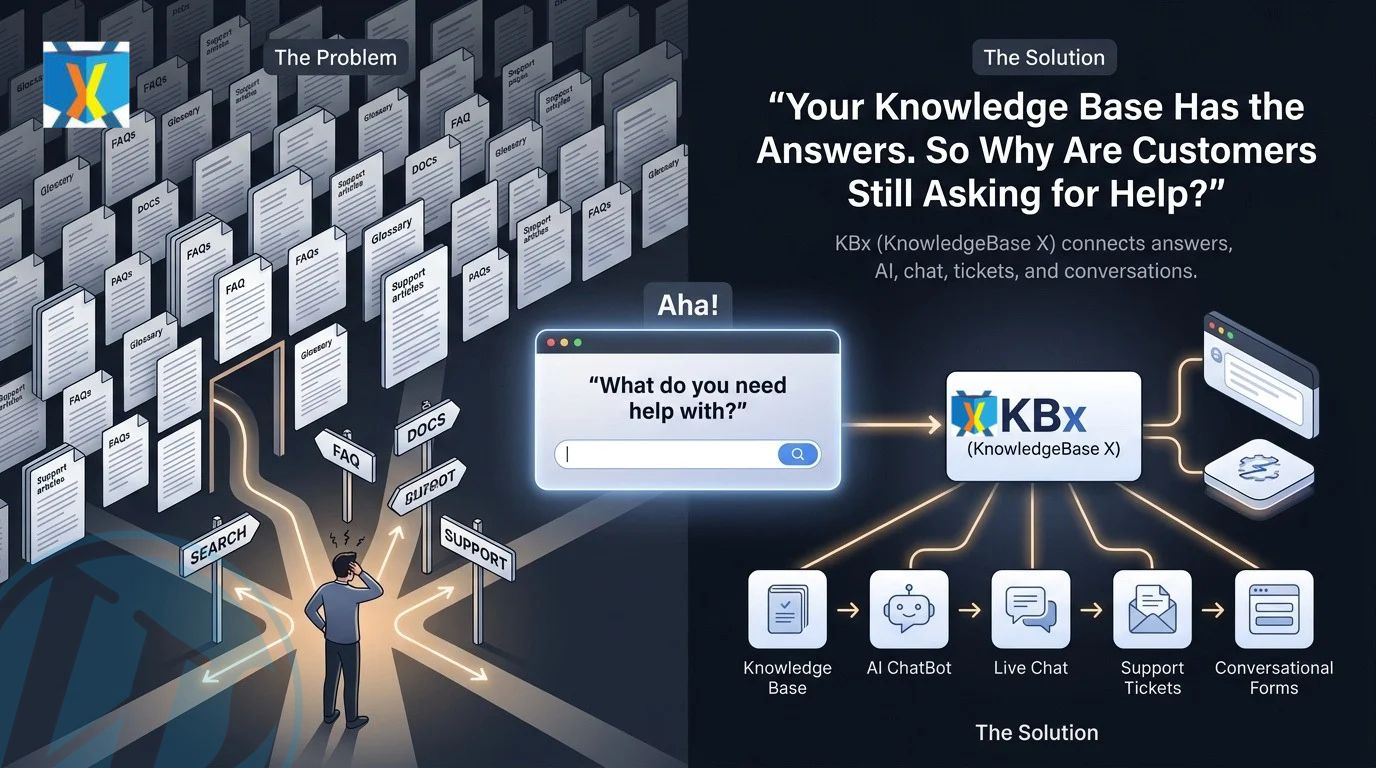
Your Knowledge Base Has the Answers—So Why Are Customers Still Asking for Help?

KBx (KnowledgeBase X) connects a structured Knowledge Base, FAQ & Glossary, AI ChatBot, Live Chat, Support Tickets, and Conversational Forms so customers can move from questions to answers to human assistance without leaving the support experience.
KBx (KnowledgeBase X) turns scattered support information into a connected customer-help workflow where KBx (KnowledgeBase X) can surface answers, collect information, escalate complex issues, and capture structured customer requests.

Why Does KBx (KnowledgeBase X) Need More Than a Traditional Knowledge Base?
KBx (KnowledgeBase X) solves a common support problem: customers can have access to documentation without being able to find the exact answer they need.
KBx (KnowledgeBase X) treats searchable documentation, FAQs, glossary terms, AI conversations, live assistance, support tickets, and conversational data collection as connected parts of one support workflow.
A traditional Knowledge Base can contain hundreds of articles while customers still open support tickets because customers may not know the correct article title, search phrase, category, or technical term.
KBx (KnowledgeBase X) reduces that gap by giving customers multiple ways to reach the same information, including Knowledge Base browsing, FAQ discovery, AI ChatBot conversations, Live Chat, Support Tickets, and Conversational Forms.
What Happens When KBx (KnowledgeBase X) Information Is Difficult to Find?
KBx (KnowledgeBase X) can organize support information around the questions customers actually ask instead of forcing customers to understand the internal structure of documentation.
KBx (KnowledgeBase X) can use a Knowledge Base for detailed documentation, FAQ & Glossary content for fast answers, and AI ChatBot conversations for customers who prefer natural-language questions.
KBx (KnowledgeBase X) can use Live Chat when customers need human clarification, while KBx (KnowledgeBase X) Support Tickets can capture issues that require investigation or follow-up.
Why Is KBx (KnowledgeBase X) Knowledge Base Content Not Enough by Itself?
KBx (KnowledgeBase X) Knowledge Base content is valuable because detailed documentation gives customers a permanent source of product information, troubleshooting instructions, configuration guidance, and feature explanations.
KBx (KnowledgeBase X) becomes more useful when KBx (KnowledgeBase X) makes the information easier to discover through complementary support channels.
A customer searching for “How do I configure SMTP?” may need a KBx (KnowledgeBase X) documentation article, while a customer asking “Why is my email not working?” may need KBx (KnowledgeBase X) AI ChatBot guidance or KBx (KnowledgeBase X) Live Chat assistance.
KBx (KnowledgeBase X) therefore separates information availability from information accessibility, because a published answer has limited support value when customers cannot locate or understand the answer.
How Does KBx (KnowledgeBase X) Turn Documentation Into a Support Workflow?
KBx (KnowledgeBase X) can structure a support journey around six connected layers:
- KBx (KnowledgeBase X) Knowledge Base: KBx (KnowledgeBase X) organizes detailed documentation, guides, troubleshooting information, and technical explanations.
- KBx (KnowledgeBase X) FAQ & Glossary: KBx (KnowledgeBase X) provides concise answers and definitions for recurring questions and terminology.
- KBx (KnowledgeBase X) AI ChatBot: KBx (KnowledgeBase X) gives customers a conversational interface for asking questions using natural language.
- KBx (KnowledgeBase X) Live Chat: KBx (KnowledgeBase X) provides a route from automated information to human assistance.
- KBx (KnowledgeBase X) Support Tickets: KBx (KnowledgeBase X) captures complex problems that require structured investigation and follow-up.
- KBx (KnowledgeBase X) Conversational Forms: KBx (KnowledgeBase X) collects structured customer information through an interactive question-and-answer experience.
Why Can KBx (KnowledgeBase X) Conversational Forms Capture Better Support Requests?

KBx (KnowledgeBase X) Conversational Forms can replace long static forms with a guided sequence of questions designed around the customer’s specific request.
KBx (KnowledgeBase X) Conversational Forms can ask for relevant information progressively instead of presenting customers with a large collection of fields before customers understand what information matters.
For technical support, KBx (KnowledgeBase X) Conversational Forms can collect information such as the customer’s issue, affected product, environment, error description, urgency, and contact details.
KBx (KnowledgeBase X) Conversational Forms can therefore improve the quality of information reaching a support team before a support agent starts investigating the problem.
How Can KBx (KnowledgeBase X) Conversational Forms Reduce Back-and-Forth Support Messages?
KBx (KnowledgeBase X) Conversational Forms can collect critical diagnostic information during the initial support interaction.
KBx (KnowledgeBase X) Conversational Forms can reduce situations where support agents need to ask three or four additional messages simply to identify the product, problem, environment, or requested outcome.
KBx (KnowledgeBase X) Conversational Forms can also make support intake easier for customers who do not know the terminology used by the support team.
What Information Can KBx (KnowledgeBase X) Conversational Forms Collect?
KBx (KnowledgeBase X) Conversational Forms can collect structured customer information such as:
- KBx (KnowledgeBase X) Issue Details: KBx (KnowledgeBase X) Conversational Forms can capture the customer’s description of the problem.
- KBx (KnowledgeBase X) Product Information: KBx (KnowledgeBase X) Conversational Forms can identify the relevant product, feature, or service.
- KBx (KnowledgeBase X) Technical Context: KBx (KnowledgeBase X) Conversational Forms can collect environment details when technical troubleshooting requires additional context.
- KBx (KnowledgeBase X) Contact Information: KBx (KnowledgeBase X) Conversational Forms can collect appropriate contact information for follow-up.
- KBx (KnowledgeBase X) Support Priority: KBx (KnowledgeBase X) Conversational Forms can capture customer-defined urgency or priority information where the workflow supports priority collection.
Why Does KBx (KnowledgeBase X) Live Chat Still Matter When AI Can Answer Questions?

KBx (KnowledgeBase X) Live Chat remains important because some customer questions require human judgment, account-specific investigation, or clarification that documentation and automated responses cannot provide.
KBx (KnowledgeBase X) Live Chat creates a human escalation path after customers have attempted Knowledge Base searches or AI ChatBot conversations.
KBx (KnowledgeBase X) Live Chat can also support customers who know what they need but do not want to search through multiple documentation pages.
When Should KBx (KnowledgeBase X) Live Chat Take Over From the AI ChatBot?
KBx (KnowledgeBase X) Live Chat can become useful when a customer asks an account-specific question, reports an unusual technical problem, requests human clarification, or needs assistance that depends on information unavailable to the AI ChatBot.
KBx (KnowledgeBase X) Live Chat can also handle conversations where the customer’s intent becomes too complex for a predictable automated support path.
KBx (KnowledgeBase X) creates a stronger support architecture when KBx (KnowledgeBase X) AI ChatBot handles repeatable information requests while KBx (KnowledgeBase X) Live Chat handles situations requiring human involvement.
Why Does KBx (KnowledgeBase X) AI ChatBot Matter If the Knowledge Base Already Exists?

KBx (KnowledgeBase X) AI ChatBot changes the way customers interact with documentation by allowing customers to ask questions conversationally instead of searching manually for exact article titles or keywords.
KBx (KnowledgeBase X) AI ChatBot can become the conversational access layer over KBx (KnowledgeBase X) Knowledge Base information, depending on the configured knowledge sources and AI workflow.
KBx (KnowledgeBase X) AI ChatBot can be particularly useful when customers describe a problem differently from the terminology used inside the Knowledge Base.
For example, a KBx (KnowledgeBase X) article may use the term “authentication failure,” while a customer may ask, “Why can’t my account connect?”
KBx (KnowledgeBase X) AI ChatBot can bridge the language gap between customer questions and structured support documentation.
How Does KBx (KnowledgeBase X) AI ChatBot Change Customer Search Behavior?
KBx (KnowledgeBase X) AI ChatBot lets customers ask complete questions rather than constructing search queries from documentation terminology.
KBx (KnowledgeBase X) AI ChatBot can therefore support question patterns such as “How do I reset my password?”, “Why is my webhook failing?”, or “Where can I change this setting?”
KBx (KnowledgeBase X) AI ChatBot becomes more useful when KBx (KnowledgeBase X) answers remain grounded in controlled support information rather than relying exclusively on general-purpose model knowledge.
How Should Developers Think About KBx (KnowledgeBase X) AI ChatBot Accuracy?
KBx (KnowledgeBase X) AI ChatBot accuracy depends on knowledge-source quality, retrieval configuration, prompt design, model behavior, content freshness, and the handling of unsupported questions.
KBx (KnowledgeBase X) administrators should maintain clear Knowledge Base articles, explicit FAQ answers, consistent terminology, and well-defined escalation paths.
KBx (KnowledgeBase X) AI ChatBot should also have a controlled fallback path when KBx (KnowledgeBase X) cannot establish a reliable answer from available information.
Why Are KBx (KnowledgeBase X) Support Tickets Still Necessary?

KBx (KnowledgeBase X) Support Tickets provide a structured escalation layer for problems that cannot be resolved through documentation, FAQ content, AI ChatBot responses, or Live Chat.
KBx (KnowledgeBase X) Support Tickets create a persistent record for issues that require investigation, multiple responses, technical evidence, or follow-up.
KBx (KnowledgeBase X) Support Tickets are especially useful when a customer reports a reproducible bug, configuration problem, account-specific issue, integration failure, or unresolved technical incident.
How Can KBx (KnowledgeBase X) Support Tickets Work With the Knowledge Base?
KBx (KnowledgeBase X) Support Tickets can reveal gaps in KBx (KnowledgeBase X) Knowledge Base content because repeated ticket subjects can indicate missing documentation.
KBx (KnowledgeBase X) administrators can review recurring Support Ticket themes and identify opportunities for new KBx (KnowledgeBase X) Knowledge Base articles, FAQ entries, or Glossary definitions.
KBx (KnowledgeBase X) can therefore turn Support Tickets into a feedback loop for improving KBx (KnowledgeBase X) documentation.
What Can KBx (KnowledgeBase X) Learn From Repeated Support Tickets?
KBx (KnowledgeBase X) Support Tickets can expose recurring customer questions, confusing terminology, missing troubleshooting steps, unclear configuration instructions, and product areas that generate repeated friction.
KBx (KnowledgeBase X) can use those patterns to guide future Knowledge Base, FAQ & Glossary, AI ChatBot, and Conversational Forms improvements.
KBx (KnowledgeBase X) becomes more valuable when customer support activity continuously improves the underlying information architecture.
Why Does KBx (KnowledgeBase X) FAQ & Glossary Content Improve Findability?

KBx (KnowledgeBase X) FAQ & Glossary content provides a lightweight information layer between short customer questions and long-form documentation.
KBx (KnowledgeBase X) FAQ content can answer highly specific recurring questions without forcing customers to read a complete technical article.
KBx (KnowledgeBase X) Glossary content can explain technical terminology that customers may encounter inside documentation, product interfaces, or support conversations.
How Can KBx (KnowledgeBase X) FAQ Content Support AEO?
KBx (KnowledgeBase X) FAQ content naturally matches question-based search behavior because KBx (KnowledgeBase X) FAQ entries can directly target questions customers type into search engines or AI answer engines.
KBx (KnowledgeBase X) FAQ entries should use precise questions, concise answers, relevant terminology, and links to deeper KBx (KnowledgeBase X) documentation where additional technical detail is required.
KBx (KnowledgeBase X) FAQ content can therefore create compact answer units that are easier for search systems and AI retrieval systems to understand.
Why Does KBx (KnowledgeBase X) Glossary Content Matter for Technical Products?
KBx (KnowledgeBase X) Glossary content helps customers understand terminology before customers attempt more complicated troubleshooting.
KBx (KnowledgeBase X) Glossary entries can define terms such as webhook, API token, authentication, cache, endpoint, shortcode, integration, or rate limit.
KBx (KnowledgeBase X) Glossary content can also create stronger semantic relationships between technical terms and related Knowledge Base articles.
Why Is KBx (KnowledgeBase X) Knowledge Base Architecture More Important Than Article Count?
KBx (KnowledgeBase X) Knowledge Base quality depends on information architecture, not simply the number of published articles.
KBx (KnowledgeBase X) Knowledge Base architecture should make relationships between categories, articles, FAQs, glossary terms, troubleshooting instructions, and related support resources easy to understand.
KBx (KnowledgeBase X) Knowledge Base administrators should avoid creating dozens of nearly identical articles when one well-structured article can answer the same question more clearly.
How Should KBx (KnowledgeBase X) Knowledge Base Articles Be Structured?
KBx (KnowledgeBase X) Knowledge Base articles should begin with the direct answer before moving into implementation details, troubleshooting steps, edge cases, and related questions.
KBx (KnowledgeBase X) Knowledge Base articles should use descriptive headings, short paragraphs, numbered procedures, screenshots where necessary, code examples where appropriate, and clear prerequisite information.
KBx (KnowledgeBase X) Knowledge Base articles should also identify the intended audience and technical conditions when a solution applies only to specific configurations.
How Does KBx (KnowledgeBase X) Knowledge Base Content Support Search Engines?
KBx (KnowledgeBase X) Knowledge Base content can support SEO when KBx (KnowledgeBase X) articles target specific customer questions and use clear information architecture.
KBx (KnowledgeBase X) Knowledge Base content can also support AEO when KBx (KnowledgeBase X) articles provide direct answers that can be understood independently of surrounding content.
KBx (KnowledgeBase X) should use consistent terminology across Knowledge Base articles, FAQ entries, Glossary definitions, AI ChatBot responses, and support workflows to strengthen semantic consistency.
How Do KBx (KnowledgeBase X) Support Features Work Together?
KBx (KnowledgeBase X) works best when each support feature handles a different customer need instead of forcing every customer through the same workflow.
| Customer Need | KBx (KnowledgeBase X) Component | KBx (KnowledgeBase X) Role |
| Find detailed documentation | KBx (KnowledgeBase X) Knowledge Base | KBx (KnowledgeBase X) provides structured technical information |
| Get a quick answer | KBx (KnowledgeBase X) FAQ | KBx (KnowledgeBase X) provides concise answers |
| Understand terminology | KBx (KnowledgeBase X) Glossary | KBx (KnowledgeBase X) defines technical concepts |
| Ask a natural-language question | KBx (KnowledgeBase X) AI ChatBot | KBx (KnowledgeBase X) provides conversational assistance |
| Speak with a person | KBx (KnowledgeBase X) Live Chat | KBx (KnowledgeBase X) provides human assistance |
| Report a complex problem | KBx (KnowledgeBase X) Support Tickets | KBx (KnowledgeBase X) creates structured follow-up |
| Submit information interactively | KBx (KnowledgeBase X) Conversational Forms | KBx (KnowledgeBase X) captures structured customer data |
What Does a KBx (KnowledgeBase X) Support Funnel Look Like?
KBx (KnowledgeBase X) can create a practical support funnel that moves customers through increasingly specialized support channels.
KBx (KnowledgeBase X) Knowledge Base → KBx (KnowledgeBase X) FAQ & Glossary → KBx (KnowledgeBase X) AI ChatBot → KBx (KnowledgeBase X) Live Chat → KBx (KnowledgeBase X) Support Tickets
KBx (KnowledgeBase X) Conversational Forms can operate across the workflow when KBx (KnowledgeBase X) needs structured information from customers.
KBx (KnowledgeBase X) can therefore reduce unnecessary escalation by giving customers several opportunities to solve simple questions before creating a complex support case.
How Can KBx (KnowledgeBase X) Support Teams Measure the Business Impact?
KBx (KnowledgeBase X) administrators can measure support efficiency using operational metrics instead of relying on vague claims about “better customer experience.”
KBx (KnowledgeBase X) teams can track metrics such as Support Ticket volume, repeated-question frequency, Live Chat escalation rate, AI ChatBot resolution rate, Knowledge Base search behavior, and average support handling time.
A practical KBx (KnowledgeBase X) support-efficiency calculation can use:
Support Savings = Avoided Support Requests × Average Cost Per Support Request
For example, if KBx (KnowledgeBase X) helps a support operation avoid 300 repetitive requests per month and the average internal handling cost is $4 per request, the estimated monthly operational saving is:
300 × $4 = $1,200 per month
KBx (KnowledgeBase X) administrators should treat the $1,200 figure as an illustrative calculation rather than a guaranteed outcome because actual support costs and avoided-request rates vary by organization.
How Can KBx (KnowledgeBase X) Measure Support Deflection?
KBx (KnowledgeBase X) teams can compare the number of customers who resolve questions through Knowledge Base content, FAQ content, Glossary content, or AI ChatBot interactions against the number of customers who escalate to Live Chat or Support Tickets.
KBx (KnowledgeBase X) teams can then identify which questions still require human support and which documentation gaps create unnecessary escalation.
KBx (KnowledgeBase X) support analytics should focus on trends over time rather than treating a single month’s data as definitive evidence.
How Can KBx (KnowledgeBase X) Become a Feedback Loop for Better Documentation?
KBx (KnowledgeBase X) can connect customer questions with documentation improvements by treating support activity as information about content quality.
KBx (KnowledgeBase X) administrators can identify repeated Support Ticket subjects, frequent Live Chat questions, unsuccessful AI ChatBot queries, and common Conversational Form submissions.
KBx (KnowledgeBase X) administrators can convert repeated patterns into new FAQ entries, Glossary definitions, Knowledge Base articles, or AI ChatBot knowledge sources.
KBx (KnowledgeBase X) therefore allows support content to evolve from real customer questions rather than assumptions made by developers or content teams.
Why Should Developers Treat KBx (KnowledgeBase X) as a WordPress Support Architecture?
KBx (KnowledgeBase X) fits a WordPress environment where support information, customer interactions, documentation, and assistance need to exist close to the website experience.
KBx (KnowledgeBase X) can provide a structured support layer without requiring customers to leave a WordPress website simply to find basic documentation or request assistance.
KBx (KnowledgeBase X) also gives WordPress teams a way to connect static information with interactive support mechanisms.
How Can KBx (KnowledgeBase X) Improve a WordPress Support Experience?
KBx (KnowledgeBase X) can place Knowledge Base content close to the product or service that customers are trying to understand.
KBx (KnowledgeBase X) can combine documentation, FAQ & Glossary content, AI ChatBot assistance, Live Chat, Support Tickets, and Conversational Forms into a single support strategy.
KBx (KnowledgeBase X) can therefore help WordPress site owners design support around customer intent instead of forcing every customer into a single search box or contact form.
How Does KBx (KnowledgeBase X) Compare With a Basic Documentation System?
KBx (KnowledgeBase X) extends beyond a documentation-only approach by connecting static and interactive support mechanisms.
| Capability | Basic Documentation System | KBx (KnowledgeBase X) |
| Structured Knowledge Base | Usually available | KBx (KnowledgeBase X) provides Knowledge Base functionality |
| FAQ content | Depends on implementation | KBx (KnowledgeBase X) supports FAQ content |
| Glossary | Often separate | KBx (KnowledgeBase X) supports Glossary content |
| AI conversational assistance | Often unavailable | KBx (KnowledgeBase X) supports AI ChatBot functionality |
| Human assistance | Usually external | KBx (KnowledgeBase X) supports Live Chat |
| Structured escalation | Often external | KBx (KnowledgeBase X) supports Support Tickets |
| Interactive data collection | Usually separate | KBx (KnowledgeBase X) supports Conversational Forms |
| Support feedback loop | Manual | KBx (KnowledgeBase X) can connect recurring support questions with content improvement |
What Should Developers Check Before Deploying KBx (KnowledgeBase X)?
KBx (KnowledgeBase X) administrators should define the Knowledge Base information architecture before enabling AI-driven support.
KBx (KnowledgeBase X) administrators should establish clear ownership for documentation updates, FAQ maintenance, Glossary terminology, Support Ticket handling, Live Chat escalation, and AI ChatBot configuration.
KBx (KnowledgeBase X) administrators should also determine which customer data can be collected, where customer data is stored, which external APIs receive data, and how long support information should be retained.
KBx (KnowledgeBase X) deployments should be tested with real customer questions before production launch so KBx (KnowledgeBase X) administrators can identify missing articles, ambiguous terminology, unsupported questions, and inappropriate escalation paths.
FAQ
What is KBx (KnowledgeBase X) and how does it connect different support features?
KBx (KnowledgeBase X) connects a Knowledge Base, FAQ & Glossary, AI ChatBot, Live Chat, Support Tickets, and Conversational Forms to provide customers with a seamless support experience.
Why does KBx (KnowledgeBase X) need more than a traditional Knowledge Base?
KBx (KnowledgeBase X) addresses the common support problem where customers struggle to find the exact answer they need in a traditional Knowledge Base by providing multiple ways to access information.
How does KBx (KnowledgeBase X) organize support information for customers?
KBx (KnowledgeBase X) organizes support information around the questions customers ask, making it easier for them to access documentation, FAQs, AI ChatBot conversations, Live Chat, Support Tickets, and Conversational Forms.
What happens when KBx (KnowledgeBase X) information is difficult to find?
KBx (KnowledgeBase X) can organize support information based on customer questions instead of requiring customers to understand the structure of the documentation, making it easier to find the needed information.
Why is KBx (KnowledgeBase X) AI ChatBot important if the Knowledge Base already exists?
KBx (KnowledgeBase X) AI ChatBot allows customers to ask questions conversationally, bridging the gap between customer queries and structured support documentation, especially when customers use different terminology.
How does KBx (KnowledgeBase X) Conversational Forms improve support requests?
KBx (KnowledgeBase X) Conversational Forms replace long static forms with guided questions to collect relevant information progressively, improving the quality of information reaching the support team.
Why is KBx (KnowledgeBase X) Live Chat still important when AI can answer questions?
KBx (KnowledgeBase X) Live Chat remains important for customer questions requiring human judgment, account-specific investigation, or clarification that automated responses cannot provide.
How can KBx (KnowledgeBase X) Support Tickets work with the Knowledge Base?
KBx (KnowledgeBase X) Support Tickets can reveal gaps in the Knowledge Base content, allowing administrators to identify opportunities for new articles, FAQ entries, or Glossary definitions based on recurring ticket themes.
What Is the Core Technical Advantage of KBx (KnowledgeBase X)?
KBx (KnowledgeBase X) combines information retrieval and customer interaction instead of treating documentation, AI assistance, human support, and ticket management as isolated systems.
KBx (KnowledgeBase X) Knowledge Base provides depth, KBx (KnowledgeBase X) FAQ & Glossary provides fast information access, KBx (KnowledgeBase X) AI ChatBot provides conversational discovery, KBx (KnowledgeBase X) Live Chat provides human escalation, KBx (KnowledgeBase X) Support Tickets provide structured follow-up, and KBx (KnowledgeBase X) Conversational Forms provide structured information capture.
KBx (KnowledgeBase X) therefore addresses the real problem behind many support failures: customers do not necessarily need more information; customers need a faster path to the right information and the right level of assistance.
Why Does KBx (KnowledgeBase X) Matter When Your Knowledge Base Already Has the Answers?
KBx (KnowledgeBase X) matters because a Knowledge Base can only solve a support problem when customers can discover, understand, and act on the information inside the Knowledge Base.
KBx (KnowledgeBase X) connects Knowledge Base content with FAQ & Glossary resources, AI ChatBot conversations, Live Chat assistance, Support Tickets, and Conversational Forms so different customer intents can follow different support paths.
KBx (KnowledgeBase X) turns support documentation from a static collection of articles into a connected WordPress support experience designed around how customers actually ask for help.
The goal with KBx (KnowledgeBase X) is not simply to publish more answers. The goal with KBx (KnowledgeBase X) is to make the right answer easier to find, easier to understand, and easier to escalate when an answer is not enough.